
SQL Server - INTERSECT Operator


Description

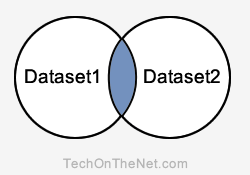
The SQL Server (Transact-SQL) INTERSECT operator is used to return the records that are in common between two SELECT statements or data sets. If a record exists in one query and not in the other, it will be omitted from the INTERSECT results. It is the intersection of the two SELECT statements.

Intersect Query
SQL Server
Explanation: The INTERSECT query will return the records in the blue shaded area. These are the records that exist in both Dataset1 and Dataset2.
Each SELECT statement within the SQL Server INTERSECT must have the same number of columns in the result sets with similar data types.

Syntax

The syntax for the NTERSECT operator in SQL Server (Transact-SQL) is:
SELECT expression1, expression2, ... expression_n
FROM tables
[WHERE conditions]
INTERSECT
SELECT expression1, expression2, ... expression_n
FROM tables
[WHERE conditions];

Parameters or Arguments

expressions
The columns or calculations that you wish to compare between the two SELECT statements. They do not have to be the same fields in each of the SELECT statements, but the corresponding columns must be similar data types.
tables
The tables that you wish to retrieve records from. There must be at least one table listed in the FROM clause.
WHERE conditions
Optional. The conditions that must be met for the records to be selected.

Note

  • There must be same number of expressions in both SELECT statements.
  • The corresponding columns in each of the SELECT statements must have similar data types.
  • The INTERSECT operator returns only records in common between the SELECT statements.

Example - With Single Expression

Let's look at an example of an INTERSECT query in SQL Server (Transact-SQL) that returns one column with the same data type.
For example:
SELECT product_id
FROM products
INTERSECT
SELECT product_id
FROM inventory;
In this INTERSECT example, if a product_id appeared in both the products and inventory tables, it would appear in your result set for this INTERSECT query.

Comments

Popular posts from this blog

Variables

Variables The main way to store information in the middle of a PHP program is by using a variable. Here are the most important things to know about variables in PHP. All variables in PHP are denoted with a leading dollar sign ($). The value of a variable is the value of its most recent assignment. Variables are assigned with the = operator, with the variable on the left-hand side and the expression to be evaluated on the right. Variables can, but do not need, to be declared before assignment. Variables in PHP do not have intrinsic types - a variable does not know in advance whether it will be used to store a number or a string of characters. Variables used before they are assigned have default values. PHP does a good job of automatically converting types from one to another when necessary. PHP variables are Perl-like. PHP has a total of eight data types which we use to construct our variables − Integers  − are whole numbers, without a decima...

About Application

The product is supposed to be an open source application, developed under the PRSC(Punjab Remote Sensing Centre)organization, for the usage of PUDA(Punjab Urban Planning and Development Authority ). It is An android based system implementing client-server model. The Po portal System provides simple mechanism for the Planning officer to share  truly verified report. The following are the main features that are included in the application are: Common platform support: Offers operating support for most of the known and commercial operating systems i.e. android operating system. Number of users being supported by the system: Though the number is precisely not mentioned but the system is able to support a large number of online users at a time. Search: search for the pending list of the cases assigned is generally by logging in to the application. Id system: provides each officer with a unique Id which is sent at the time of report submission. Verification  section: Verif...